
Trend Tracker Tool
Role: UX/UI Designer
Impact: Create a simple and easy-to-use tool that empowers users to be able to compare and filter trending topics across multiple social networks
OVERVIEW
Project Goals
Create a tool that can do and showcase the following:
Allow users to compare trending topics
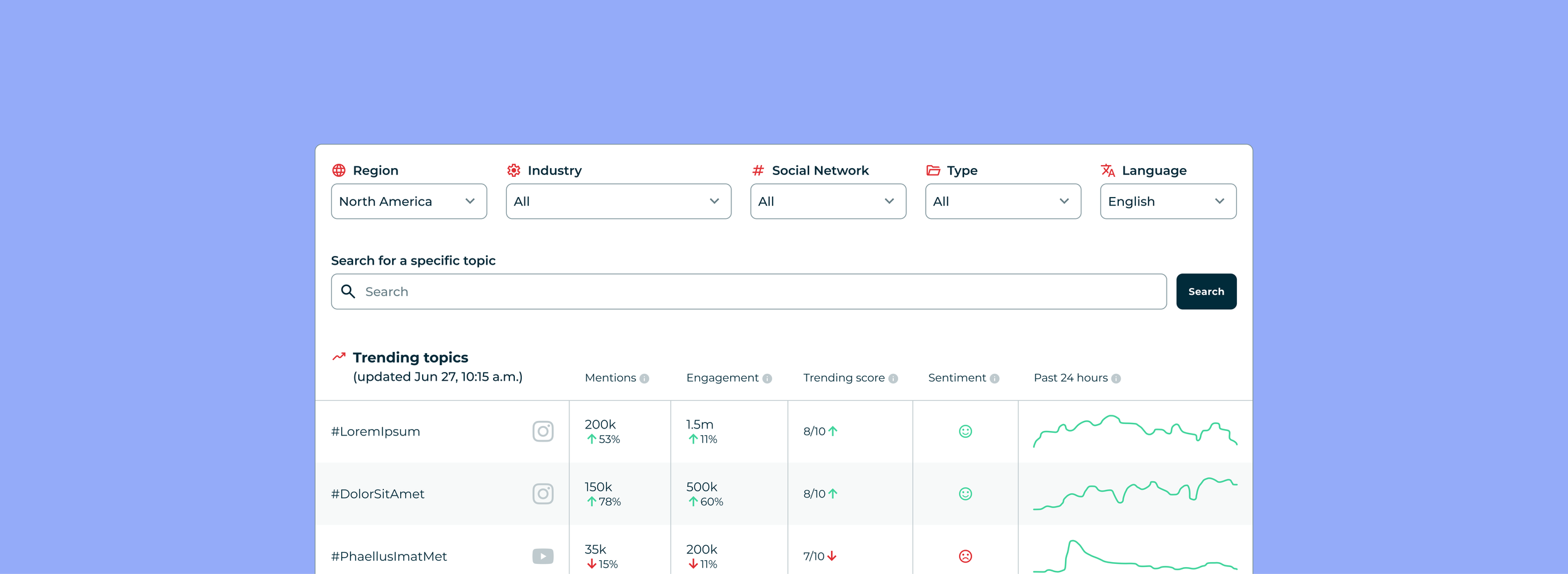
Allow users to filter the trends via Region, Industry, Social Network, Type, and Language
Allow users to see if a trend is gaining or losing momentum
Show audience sentiment towards the specific topic
Increase traffic and conversion on the website
Additionally, the web page for the tool will need to accommodate lengthy amounts of copy for SEO optimization, as well as a component that promotes an email newsletter related to the top trending topics.
Challenges
Creating a brand new tool starts with having a lot of features on the table that need to be pared down to key essentials
This is a net new tool that does not currently exist with competitors. In trying to capitalize on the growing awareness towards using this technology, the tool itself should be straightforward and easy to use. It also needs to be able to show value to a user upfront to keep them engaged and see how the benefits link to the tracking tools within the product—essentially acting as a mini demo.
EXECUTION
Understand of the Tool
Before starting on any design work, we needed to answer the following questions:
What is this tool?
Who is this tool for?
How would it convert?
The tool itself will be an embed on the website that enables users to be able to see what the topics are trending at the time of their query. The ideal user profile are Social Media Managers, Brand Marketers, Journalists, and Individual Creators who want to stay on top on what is trending in any given industry on any network.
While the tool is free to use, we hope to inspire those users to see the value of these timely updates and convert into the product for a full experience of this functionality.
Initial High Fidelity Wireframes for User Research
With gated experiences and paywall opportunities in mind, I created high fidelity wireframes for initial user research. The challenge was how to balance showing enough value in the free product to prompt a user to see the real value add in converting into the larger product.
Suggestions also came in the form of gating certain parts of the tool by locking specific filters behind a gate, being able to see more than a certain amount of results, or a popup modal after a time limit. Ultimately, these features felt more like hindrances than opportunities and I suggested gathering results in a fully ungated experience initially before optimizing for conversion.
User Research
Through unmoderated user testing, a pool of six participants took part in a study to help give the team the following insights:
Validate the usefulness and clarity of the tool prototype
Understand how users engage with the tool: Do they see it as valuable, actionable, and worth returning to?
Learn what would increase its utility, retention, and conversion potential
Identify any friction points or unmet expectations in the current experience.
Identify key usability and UX issues that could hinder engagement, lead generation, or return visits
Participant background: Social Media Managers and Marketers who frequent trends on a regular basis and who use Social Listening and Trends Discovery tools (including Hootsuite and competitors)
Research Takeaways and Next Steps
We took these results to the team as a whole with development to be able to scope out what additional features would be feasible to include in the MVP of the product for launch.
High Fidelity Wireframes
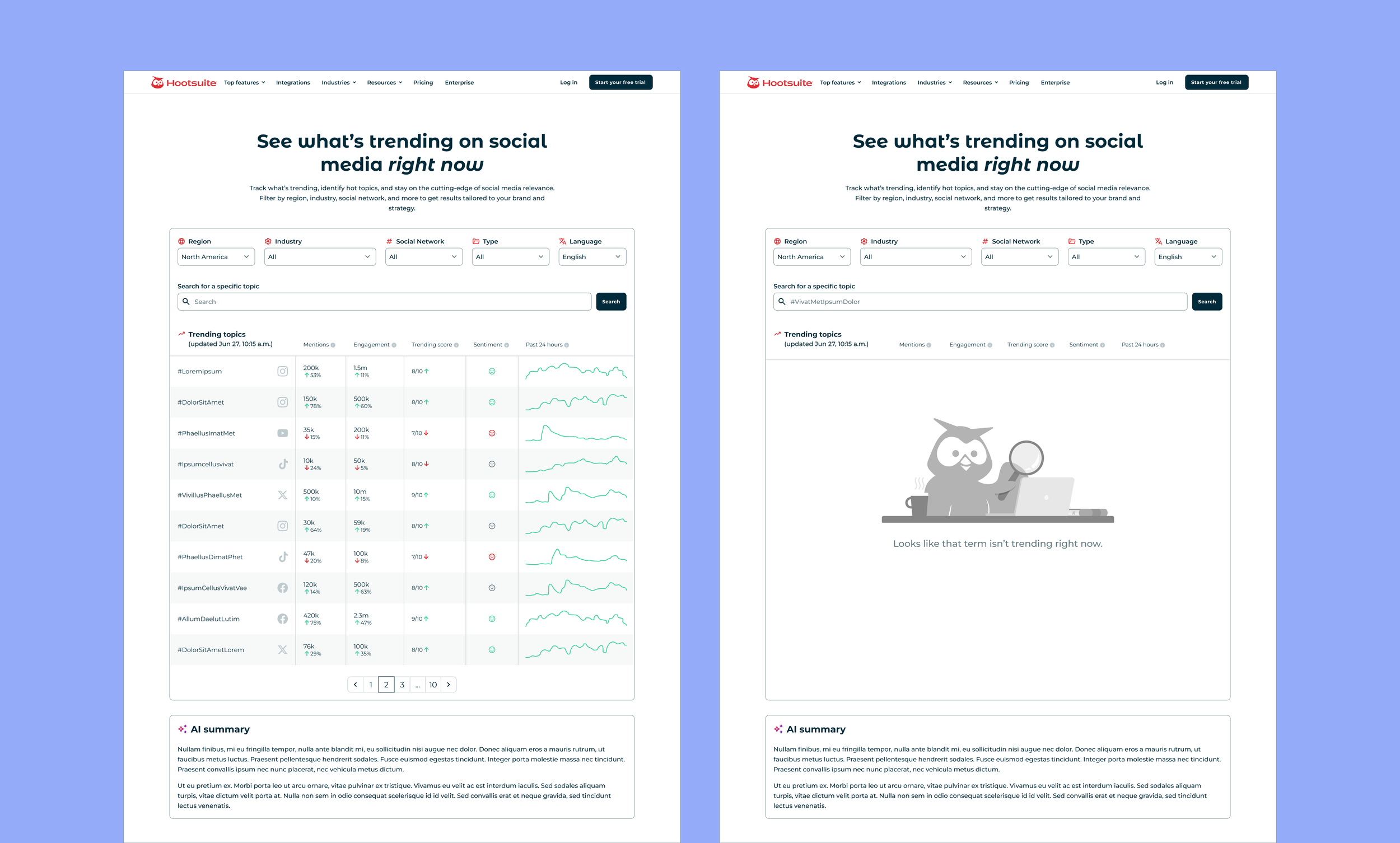
For development handover, I adjusted the wireframes to include social network icons next to the trends to know on which platform a specific trend is trending, a search bar for users to be able to search for a specific topic, and an empty state for if a search result comes back with no results.
Bonus Feature
An additional request from the Marketing team was the creation of a news ticker style component that would be used on select pages of the website (such as the homepage, specific blog posts, or feature related pages) to incite curiosity for the Trend Tracking Tool. From that brief, I created a sticky component that would float at the bottom of a viewport that also included controls for users with accessibility needs.
OUTCOMES
Cross-functional Challenges
This project spanned across both Marketing and Product teams, meaning there was a lot of visibility from the conception and pitch of this project through to its execution. From a design perspective, it was essential to manage stakeholder expectations in the tool’s functionality by working closely with developers to determine what features were most viable for MVP and what features would need to be shelved for a V2 iteration.
For example, whilst the AI Summary was a high priority recommendation, due to developer estimates, that specific work would need to be tabled for a later iteration post-launch.
Lesson Learned
How to balance a product’s usability and value with company objectives.
On occasion, revenue goals may inspire friction points for users (in the form of popup modals, gated experiences, etc.) that feel counter-intuitive to a good user experience. It’s always key to advocate for the user first, because a good user experience will keep users engaged and returning to use your product. Allowing a user base to grow organically through free tools and content can grow a paid user base as these tools evolve from those initial starting points.